Quadra Stores
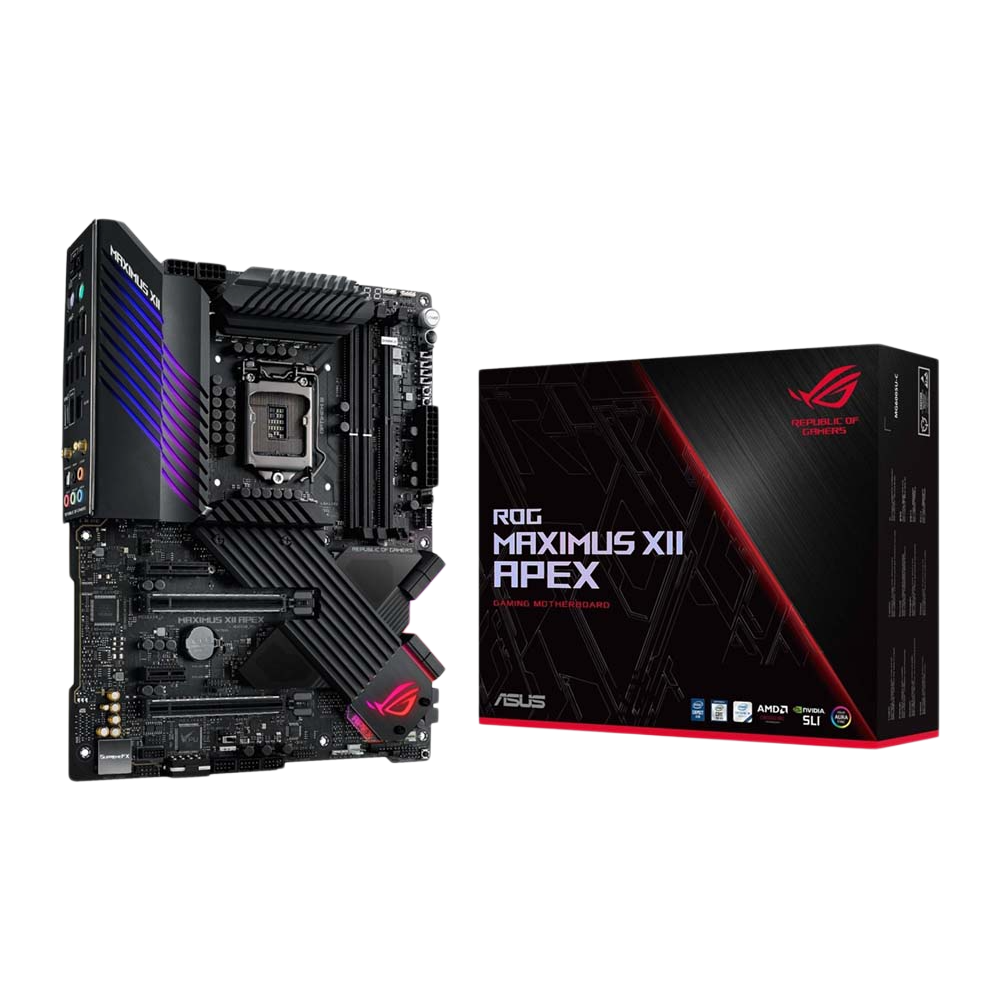
ASUS ROG MAXIMUS Z490 XII APEX DDR4 Motherboard - Black
SKU:90MB13D0-M0EAY0
QR Code : 1202662
In stock
Couldn't load pickup availability
Share
Description
Description
ASUS Intel Z490 ROG MAXIMUS XII APEX 10th Gen ATX Motherboard
PERFORMANCE PUSHED TO THE APEX
Introducing the ASUS Maximus XII APEX, this outstanding motherboard is the premiere overclocking platform for extreme OC enthusiasts looking to unlock the full potential of the latest generation Intel Core processors. Its optimized layout, enhanced power delivery, improved control and striking design combined with a myriad of customization options will appeal to overclockers, gamers, and PC builders alike.
AN ENTHUSIASTS DREAM
The Overclocker’s Tookit with hardware-level controls will aid your overclocking experience. They’re quick and easy time-savers designed to help you break more records.
POWER DELIVERY ENHANCEMENTS
Modern CPU architectures up the ante for motherboard power design by transitioning from deep power saving modes to full load almost instantaneously. Our latest VRM architecture rises to the challenge by utilizing teamed power stages to rapidly swing current, while maintaining exemplary thermal performance.
COMPREHENSIVE COOLING ZONE
Enjoy comprehensive control over fans and water pumps, via either Fan Expert 4 or our UEFI. Whether you're cooling with air or water, Auto-Tuning mode intelligently configures all parameters with a single click. There's also an Extreme Quiet mode, which reduces all fan speeds to below the default minimum — keeping your system whisper-quiet when performing light tasks.
MULTIPLE TEMPERATURE SOURCES
Each header can be set to monitor and react to three user-configurable thermal sensors for workload-based cooling. And all settings can be easily managed by Fan Xpert 4 or UEFI.
EXTREME COOLING FOR AN EXTREME MOTHERBOARD
A comprehensive cooling solution features carefully-designed heatsinks with the perfect balance of surface mass and air flow. With the addition of fan headers, the onboard cooling of Maximus XII Apex has more than enough capacity for specialization, maintaining system stability under any condition.
OPTIMEM III
Boasting proprietary memory trace layout tweaks that improve signal integrity and mitigate noise, ASUS OptiMem III is more compatible with 3600 MHz+ memory kits, allowing them to run at higher frequencies. You can opt to optimize memory for high frequency settings, or low latency settings. Stack Maximus XII Apex with your favorite modules and maximize throughput of the new 10th Generation Intel ® Coreâ„¢ Comet Lake-S processor for applications that demand massive bandwidth.
MAXIMUS COMPATIBILITY
ROG Maximus XII Apex features three M.2 slots wired directly to the Z490 PCH. Two slots support both SATA and PCIe 3.0 x4 modes, and the other slot supports PCIe 3.0 x4 for NVMe. Additional Intel ® Optaneâ„¢ memory recognizes, remembers, and speeds up access to most frequently used files, applications, and games for faster, more responsive performance.
OVERCLOCKING INTELLIGENCE
Take care of complex tuning with just one click. ASUS 5-Way Optimization is a system-wide tuning utility that overclocks the processor and tunes fan speeds to ensure the best balance between cooling and acoustics. The automated CPU tuning feature of 5-Way Optimization leverages the same on-board intelligence as AI Overclocking, but goes further by running a Prime95 based stress test to deliver a result that's well-tuned from the beginning.
DISPLAY YOUR OWN CUSTOM LOGO
ROG Maximus XII Extreme motherboards is equipped with LiveDash, a built-in 2†OLED panel that displays useful information and customisable graphics. During the power-on, self-test (POST) phase, OLED shows key progress stats in simple language, using traditional POST codes. Then, during normal operation, the panel shows a choice of CPU frequency, device temperatures, fan speeds or information from the Water-Cooling Zone. You're also able to customise the default OLED GIF, so it'll display your own image or animation.
Specifications
-
CPUBuild in Intel ® Socket 1200 for 10th Gen Intel ® Coreâ„¢, Pentium ® Gold and Celeron ® Processors
Supports Intel ® Turbo Boost Technology 2.0 and Intel ® Turbo Boost Max Technology 3.0**
* Refer to www.asus.com for CPU support list
**Intel ® Turbo Boost Max Technology 3.0 support depends on the CPU types. -
ChipsetBuild in Intel ® Z490
-
MemoryIntel ® 10th Gen Processors
2 x DIMM, Max. 64GB, DDR4 4800(O.C.)/4700(O.C)/4600(O.C)/4500(O.C)/4400(O.C)/4266(O.C.)/4133(O.C.)/4000(O.C.)/3866(O.C.)/3600(O.C.)/3466(O.C.)/3400(O.C.)/3333(O.C.)/3300(O.C.)/3200(O.C.)/3000(O.C.)/2933(O.C.)/2800(O.C.)/2666/2133 MHz Memory *
Dual Channel Memory Architecture
Supports Intel ® Extreme Memory Profile (XMP)
* Double Capcity DRAM support depends on the DRAM models -
Multi-GPU SupportSupports NVIDIA ® 2-Way SLI ® Technology
Supports AMD 2-Way CrossFireX Technology -
Expansion SlotsIntel ® 10th Gen Processors
2 x PCIe 3.0 x16 (Single at x16, dual at x8/x8)
Intel ® Z490 Chipset
1 x PCIe 3.0 x4
1 x PCIe 3.0 x1 -
StorageIntel ® Z490 Chipset :
1 x ROG DIMM.2 Module supports 2 M.2 Socket 3 , with M key, type 2242/2260/2280/22110 storage devices support (SATA & PCIE 3.0 x 4 mode)*1
1 x M.2_1 socket 3, with M key, type 2242/2260/2280 storage devices support (PCIE 3.0 x 4 mode)*2
6 x SATA 6Gb/s port(s)*3
Support Raid 0, 1, 5
ASMedia ® SATA 6Gb/s controller :
2 x SATA 6Gb/s port(s),
Intel ® Optaneâ„¢ Memory Ready -
LANIntel ® I225-V 2.5Gb Ethernet, 1 x Gigabit LAN Controller(s)
Anti-surge LANGuard -
Wireless Data NetworkIntel ® Wi-Fi 6 AX201
Wi-Fi Intel ® Wi-Fi 6
Supports channel bandwidth: HT20/HT40/HT80/HT160. Up to 1.73Gbps transfer speed
2 x 2 Wi-Fi 6 (802.11 a/b/g/n/ac/ax) with MU-MIMO supports dual frequency band 2.4/5GHz -
BluetoothBluetooth v5.1*
*BT 5.1 function will be ready in Windows 10 build 19041 or later. -
AudioROG SupremeFX 7.1-Channel High Definition Audio CODEC S1220A
- Impedance sense for front and rear headphone outputs
- High quality 120 dB SNR stereo playback output and 113 dB SNR recording input
- Supports up to 32-Bit/192kHz playback
Audio Feature :
- SupremeFX Shieldingâ„¢ Technology
- Optical S/PDIF out port(s) at back panel
Premium Japan-made audio capacitors provides warm, natural, and immersive sound with exceptional clarity and fidelity -
USB PortsRear USB Port ( Total 10 )
5 x USB 3.2 Gen 2 port(s)(4 + Type-A +1 + Type-C)
5 x USB 3.2 Gen 1 port(s)
Front USB Port ( Total 8 )
1 x USB 3.2 Gen 2 front panel connector port(s)
2 x USB 3.2 Gen 1 port(s)
5 x USB 2.0 port(s) -
ROG Exclusive FeaturesCondensation detection
Clear CMOS button
ROG CPU-Z
ROG CloneDrive
Slow Mode
Overwolf
ReTry Button
Safe Boot Button
Start Button
Reset Button
LN2 Mode
Extreme Engine Digi+ :
- Infineon TDA21472 Power Stage
- MicroFine Alloy Chokes
- 10K Black Metallic Capacitors
Mem TweakIt
ROG Extreme OC kit :
- OptiMem III
Double Power :
- Dual 8 -pin CPU
ProbeIt
UEFI BIOS features :
- O.C. Profile
- GPU.DIMM Post
- Tweakers' Paradise
- ROG SSD Secure Erase
- Graphic Card Information Preview
Extreme Tweaker
ROG Patented Pre-mounted I/O Shield
ROG Exclusive Software
- RAMCache III -
Special FeaturesASUS Dual Intelligent Processors 3 - SMART DIGI+ Power Control :
- 5-Way Optimization tuning key perfectly consolidates TPU, EPU, DIGI+ VRM, Fan Expert 4, and Turbo App
AI Overclocking
Fan Xpert4
- Fan Xpert 4 featuring Fan Auto Tuning function and multiple thermistors selection for optimized system cooling control
- Advanced fan and liquid controls for ultimate cooling and quietness
ASUS 5X Protection III :
- ASUS SafeSlot Core: Fortified PCIe Slot prevents damage
- ASUS LANGuard: Protects against LAN surges, lightning strikes and static-electricity discharges!
- ASUS Overvoltage Protection: World-class circuit-protecting power design
SafeDIMM slot
AURA :
- Aura Lighting Control
- Aura RGB Strip Headers
- Aura Lighting Effects Synchronization with compatible ASUS ROG devices
- Addressable Gen 2 Header
ASUS Exclusive Features :
- USB BIOS FlashBackâ„¢
- MemOK! II
- AI Suite 3
- Anti-Surge
- ASUS CrashFree BIOS 3
- ASUS NODE : hardware control interface
- BIOS FlashBackâ„¢ Button
- Clear CMOS Button